MemoRay Trust-First Local AI Memory
Product overview

MemoRay Product Facts

Current capabilities, local-processing boundaries, supported files, system fit, and limitations for MemoRay Founder Access on Windows.

MemoRay is Trust-First Local AI Memory: downloadable Windows software published by RayAI LLC for searching selected personal and small-business documents. “Trust-First” is product language, not a certification or an absolute security assurance.

MemoRay is available through controlled Founder Access with limited, hands-on onboarding for approved participants. Access is not guaranteed; features may change and defects may remain.

Facts at a glance

Version covered
0.5.0
Platform
Windows 10 and Windows 11, 64-bit x64
Memory
8 GB RAM minimum; 16 GB recommended
Storage
At least 2 GB free disk space, plus room for imported copies and search data; SSD recommended
Product phase
Controlled Windows Founder Access

Supported files

MemoRay imports PDF, DOCX, JPG/JPEG, PNG, plain text (.txt, .text, .log), Markdown (.md, .markdown), reStructuredText (.rst), AsciiDoc (.adoc, .asciidoc), and Org (.org).

Text markup is read as inert text. MemoRay does not execute embedded commands, includes or remote references. Readable, unencrypted DOCX is supported. Malformed, encrypted, binary, empty or over-limit inputs are rejected without changing the original.

CSV, XLSX, PPTX, standalone JPEG 2000/JP2/J2K and TIFF are not supported import formats. See the FAQ for text encodings and size limits.
From selected files to sources

  1. Select. Choose supported files or a folder. Folder selection does not monitor or synchronize that folder.
  2. Review. Add or remove staged files before processing. Unsupported files are skipped while you continue with supported files.
  3. Process locally. MemoRay reads text and prepares search on your device. Review duplicates, failures and uncertain extracted details.
  4. Search or ask. Browse, sort, filter and review imported documents, search indexed content, or ask a question.
  5. Review sources. Open the supporting source and compare important information with the document.
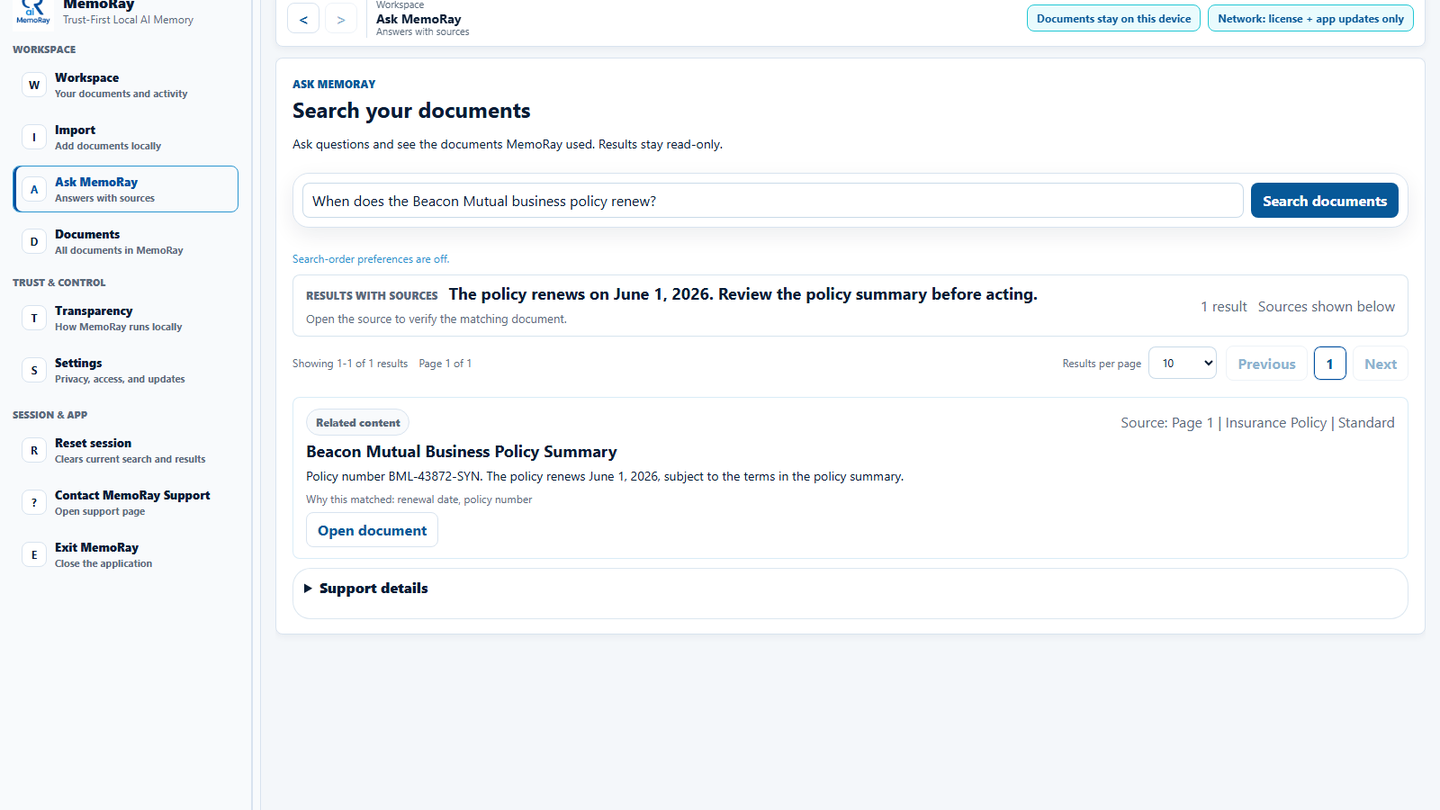
MemoRay answer showing a synthetic policy renewal date and its supporting document source.
Synthetic demonstration: review the answer and open the supporting source before acting.

Answers with sources

Ask MemoRay provides answers with sources based on matching information in imported documents. Match labels describe the available evidence; they do not guarantee that a source answers the question. Open the source and verify important information before relying on a result.

Results may be incomplete, inaccurate, unrelated or insufficient. Source locations depend on the file format, extraction quality and document structure.

What runs locally and what uses the network

Document reading, OCR/text extraction, search preparation, retrieval and Ask MemoRay run on the Windows device. Network access is used for Founder Access activation and validation, application update checks, and support pages or reports you choose to open or share. MemoRay does not send document content, filenames, local file paths, queries, extracted text, search data or search indexes to MemoRay licensing or update services for the core workflow. Opening source files in cloud-synchronized folders may involve your storage provider outside MemoRay’s boundary.

MemoRay stores imported copies, document details, extracted text and search data locally. Your Windows account, device controls, backups and storage-provider settings remain separate responsibilities.

Standard and Protected Documents

For documents marked Protected, MemoRay encrypts the saved copy and retained derived content used for search and review, including extracted text, search data and sensitive history. Unlocking is required to search or view it; locked items hide identifying details. Standard content is not protected by the Protected Documents password. Original files outside MemoRay and external backups remain separate. Protection does not defend an already-unlocked device against malware, an administrator or screen capture.

You create the Protected Documents password locally. It is separate from your Founder Access license key, and RayAI/MemoRay cannot recover it. Keep your originals and password. Detailed password and recovery guidance is in the FAQ.

Reading, accuracy and performance limits

Search covers only information MemoRay successfully reads and indexes. A successful import does not mean every word or detail is searchable. Low-quality scans, handwriting, rotation, complex layouts and OCR-derived details can require manual review.

Performance varies with document size, OCR quality, library size and device resources. MemoRay is intended for adults evaluating local document search for personal and small-business records. It is not professional advice; high-risk decisions require independent human verification.

Updates and diagnostics

A normal supported in-place update is designed to preserve imported documents, saved details and settings without routine reimporting. A 0.4.0 upgrade may ask for a Protected-storage check, the current Protected Documents password and an app restart. Keep original files and the password, and do not remove the workspace or downgrade during the update.

Updating does not automatically reimport or repair malformed titles and details retained from earlier imports. See 0.5.0 release notes for upgrade behavior and known limitations.

The MemoRay application does not collect document/query analytics. Bounded app diagnostic records are stored locally. An issue report is prepared as a local file and is not automatically sent. You choose whether to include diagnostics and share the report. Review it first: your issue description and attachments may contain information you intentionally provide. Website analytics and consent controls are separate.

Founder Access and product scope

Approved participants receive license and secure-download instructions after request review and must accept the Terms and EULA. Activation happens after installation. See Founder Access and the FAQ for eligibility and commercial terms.

MemoRay has no Windows ARM64, macOS, Linux or mobile application. Version 0.5.0 does not include cloud document synchronization, multi-device document synchronization, paid checkout or the experimental Worldclass OCR option.

Read the Privacy Policy, Terms, Refund Policy and EULA for policy and legal details.

Request Founder Access

Requests are reviewed; acceptance is not guaranteed.