Trust-First Local AI Memory · Windows Founder Access
Find answers in your documents.
Private, local-first AI document search for Windows. Import your documents, ask questions, and check the sources. Core document processing runs on your device without uploading your files.
Windows Founder Access is available while onboarding remains limited.
General availability currently planned for October 2026
MemoRay is approaching general availability.
Founder Access remains open until MemoRay reaches general availability.
MemoRay 0.5.0 is now available to approved Founder members using Windows 10 or Windows 11.
Paid checkout is not yet live. Standard MemoRay individual annual subscriptions are planned at US$99/year. Eligible pre-GA Founder Members may receive a Founder Member renewal price of US$49/year for one continuously active individual subscription when paid checkout becomes available. This is not a general public price.
Search the records you already have — without handing them to cloud AI.
Import the supported files you choose, then search or ask questions with answers that show sources.
Find tax records, receipts, and IDs
Search tax PDFs, statements, receipts, scans, and sensitive personal records without digging through folders or relying on exact filenames.
Search invoices, warranties, and policy details
Locate purchase records, service documents, insurance, benefits, financial, or policy documents and verify the source behind an answer.
Find signed agreements and client records
For consultants, founders, and micro-business owners, retrieve signed agreements, proposals, statements of work, and client records.
These examples are retrieval scenarios, not a promise that every file will produce a perfect answer. Result quality depends on file quality, OCR quality, and whether the answer is present in the imported documents.
What MemoRay can do
Import documents, search locally, and ask grounded questions.
These reviewed 0.5.0 views use synthetic demonstration documents.
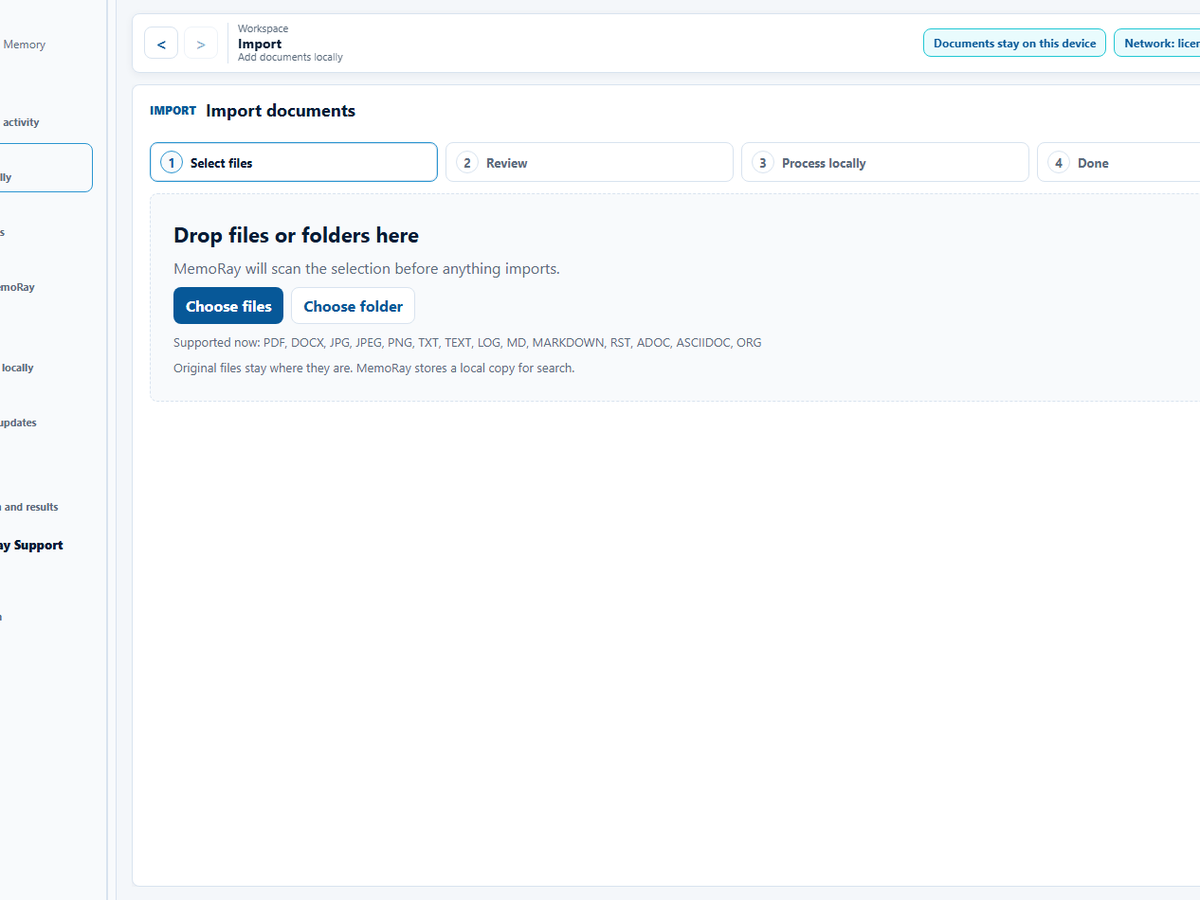
01 Select files
Choose documents or a folder to begin.
Nothing is imported yet. After selection, MemoRay shows the files for review before local processing.
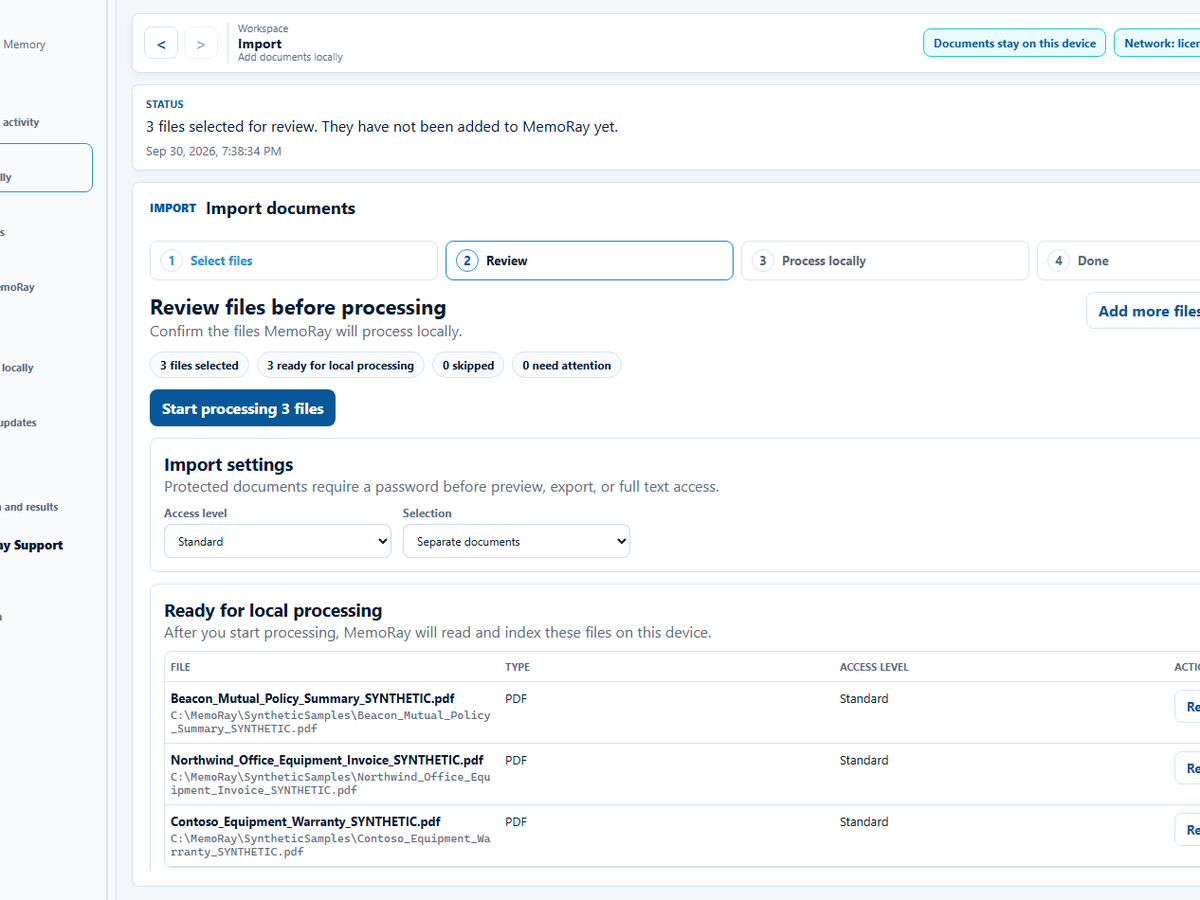
02 Review selected files
Confirm what MemoRay will process.
Review filenames, file types, and access level before starting local processing.
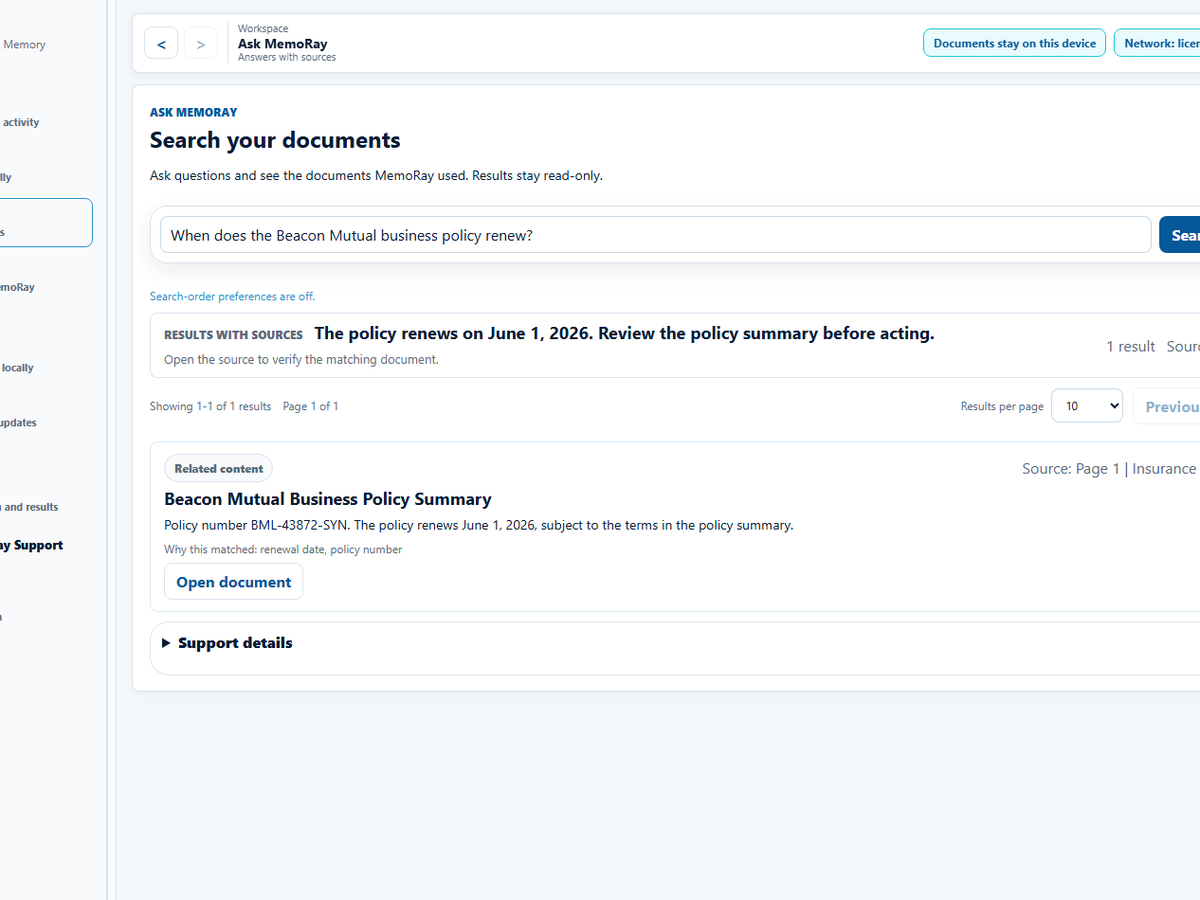
03 View sources
Open the source behind an answer.
Open a result to verify it against the document.
Product Tour
Select, search and review sources
Read the MemoRay workflow from file selection through source review.
Silent demonstration using synthetic documents. Captions and a text transcript are available.
How MemoRay Is Different
Built for private document memory — not generic AI chat.
MemoRay is not trying to replace every AI assistant, file search tool, or note app. It has one focus: helping you search and ask across selected personal records while keeping the core workflow local and showing sources.
Alternative
What it does well
Where MemoRay is different
Cloud AI assistants
Powerful general reasoning and fluent answers.
MemoRay is designed for private document memory where core workflows do not require uploading your files.
Local AI chat tools
Run models locally and experiment with private inference.
MemoRay focuses on document import, local processing, search, answers with sources, and user-controlled memory — not just chatting with a model.
File search / desktop search
Find filenames and text matches.
MemoRay adds natural-language search and Ask MemoRay results with sources across imported records.
Privacy & Local Processing
Trust is designed into the workflow, not added as a slogan.
MemoRay's Founder Access release is intentionally explicit about what runs locally, what is optional, and what is still being hardened. The goal is not vague privacy language - it is clear, inspectable product behavior.
No Document Upload
Core MemoRay document processing does not require file upload.
No document content is uploaded for the core local workflow.
Local Processing
Core document workflows are designed to run on the user's device.
File import, text reading, making documents searchable, search, and results with sources operate locally for the core path.
Storage & Protected Documents
MemoRay is careful about local storage claims.
Stored locally
MemoRay stores imported copies, document details, extracted text and search data locally.
Standard content is not protected by the Protected Documents password. Original files outside MemoRay and external backups remain separate.
Protection boundaries
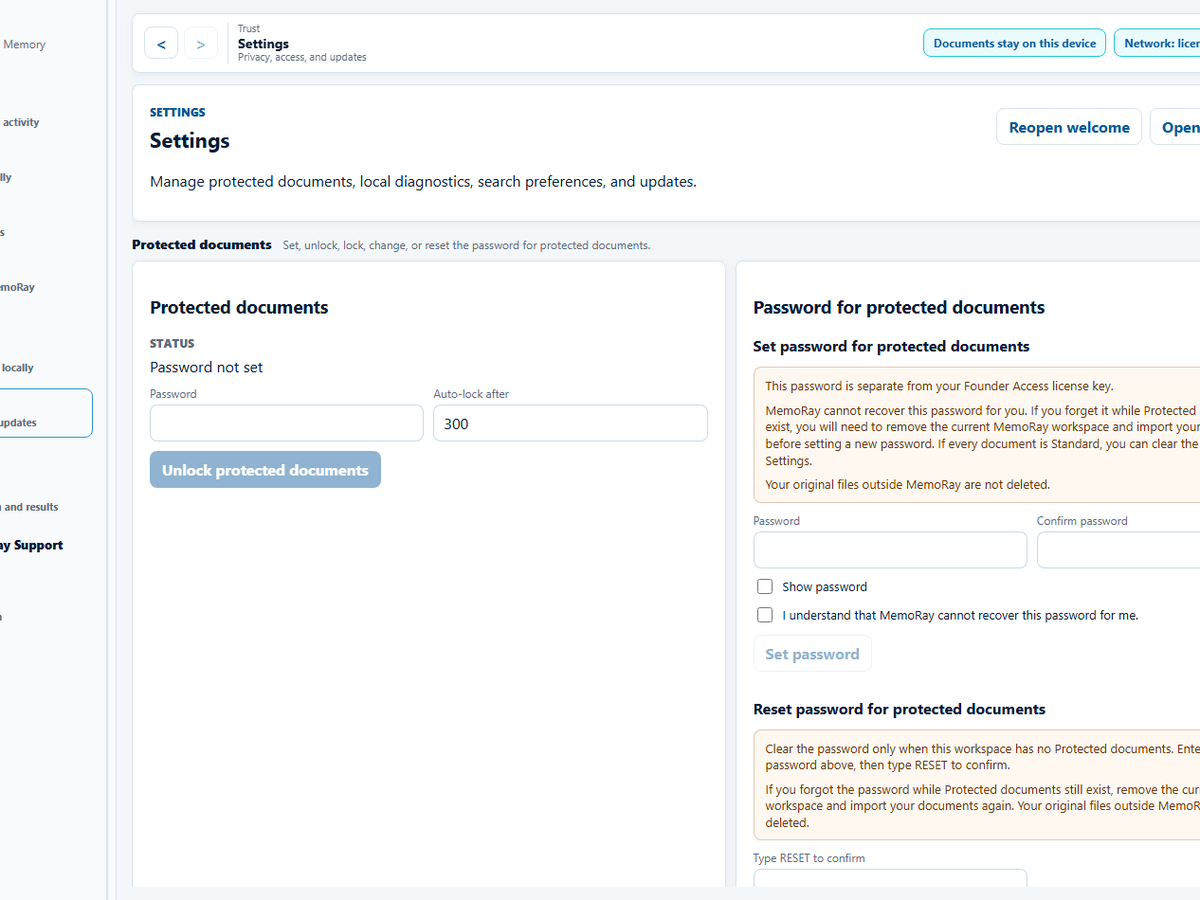
For documents marked Protected, MemoRay encrypts the saved copy and retained derived content used for search and review, including extracted text, search data and sensitive history. Unlocking is required to search or view it; locked items hide identifying details.
Protection does not defend an already-unlocked device against malware, an administrator or screen capture.
Password & recovery
The Protected Documents password is local, separate from your Founder Access license key and cannot be recovered by MemoRay Support. Keep originals and your password. See Protected Documents boundaries and recovery guidance.
Clear trust boundary for your documents.
Network access is limited to license activation/validation, app updates, and support forms you choose to submit.
MemoRay processes imported documents, text reading, search, and Ask MemoRay locally on your Windows device. Network access is used for Founder Access license activation, license validation, app update checks, and support forms you choose to submit.
Document content is not sent to MemoRay licensing or update services.
If you submit a support form, the message and attachments you choose are sent to MemoRay Support. Review them first and remove private document content, passwords, and license keys.
Your Windows device
Imported documents
Text reading
Search locally
Ask MemoRay
Answers with sources
Documents stay here.Core document processing does not send document content to MemoRay services.
MemoRay services
Founder Access license activation
License validation
App update checks
Support form, only if you submit it
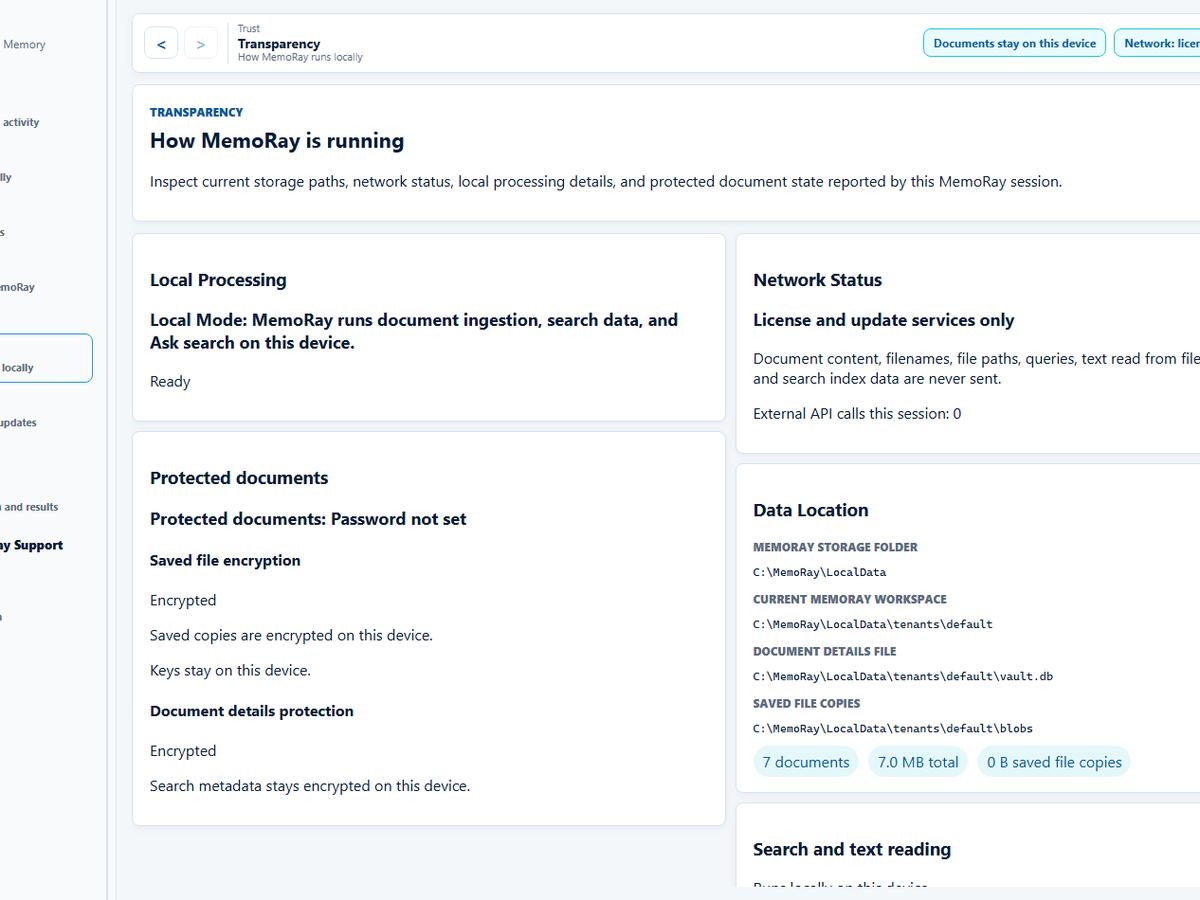
See how MemoRay runs on your device.Manage access to protected documents. Protected documents use a separate password created locally inside MemoRay.
How the local workflow works
Core document workflow runs on your device.
This is separate from the network services used for Founder Access licensing, update checks, and support forms you choose to submit.
Your files remain the source of truth for search and Ask results.
Text reading, making documents searchable, lexical search, and local retrieval run locally.
Read the privacy policy and FAQ for more detail on local processing and current product limits.
Founder Access
Founder Access remains open until MemoRay reaches general availability.
General availability is currently planned for October 2026. Requests from Windows users are reviewed before onboarding, and Founder pricing eligibility requires activation of the approved Founder Access license before general availability.
MemoRay Founder Access for Windows
A limited offering for approved participants, with hands-on onboarding and the current MemoRay local document workflow.
The approved participant receives the license and secure download instructions.
Before the download begins, you’ll be asked to agree to the MemoRay Terms of Use and End User License Agreement and acknowledge the Privacy Policy. If you need help with the download or your link is unavailable, please use the MemoRay support form.
Founder Access
Request Founder Access
Approved users receive 6 months of free access while MemoRay is shaped with a small group of privacy-conscious professionals, micro-business owners, and power users.
Founder Access Cohort
Request Founder Access.
Founder Access is currently free. Installing or using MemoRay during Founder Access does not automatically start a paid subscription or charge your payment method.
Paid checkout is not yet live. Standard MemoRay individual annual subscriptions are planned at US$99/year. Eligible pre-GA Founder Members may receive a Founder Member renewal price of US$49/year for one continuously active individual subscription when paid checkout becomes available. This is not a general public price.
Planned pricing when paid checkout becomes available:
Standard individual annual subscription: US$99/year. One person and one device per individual license.
Eligible Founder Members from the pre-GA Founder Access program: Six months free, then US$49/year for one individual annual MemoRay subscription while it remains continuously active. This is not a general public price.
When paid checkout becomes available, standard paid subscriptions will renew automatically each year unless canceled before renewal. Cancellation stops future renewals; access continues through the paid term.
The Founder Member price is annual only. It continues on annual renewal while the eligible subscription remains continuously active. It is not automatically guaranteed after cancellation, a material lapse following failed payment recovery, or failure to convert through the approved Founder flow.
Founder pricing is personal and is not transferable to another person, organization, or account/email unless the transfer is manually approved. It does not apply to future team plans, seats, multiple plans, Advisory services, paid courses, usage billing, or other products unless explicitly stated otherwise.
Founder pricing does not stack with other discounts or promotions unless explicitly allowed. Founder bug or suggestion credits apply against the Founder Member's applicable annual subscription price, normally US$49/year for an eligible Founder Member.
Founder Access requests will close when MemoRay reaches general availability, currently planned for October 2026.
Founder pricing eligibility requires activation of the approved Founder Access license before MemoRay reaches general availability.
Founder members will receive renewal details before the free period ends. No automatic charge applies during Founder Access.